
reCAPTCHA v2 Solver
Solve supported reCAPTCHA v2 checkbox and challenge flows.


Install the CaptchaAI Chrome extension, connect your API key, and solve supported CAPTCHA challenges directly in your browser workflow. One extension, multiple supported CAPTCHA types, fast setup, and flexible controls.
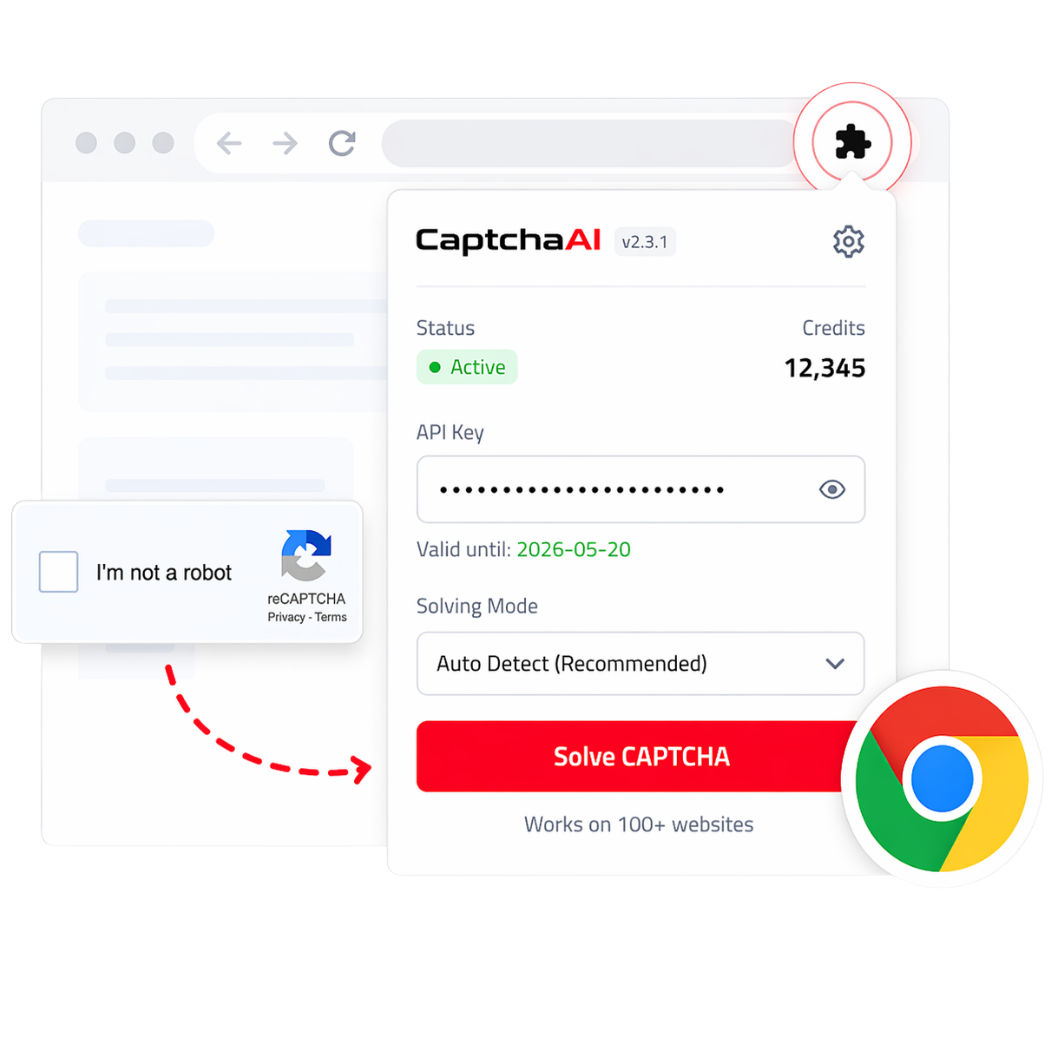
Use the CaptchaAI Chrome extension to handle supported CAPTCHA types inside real browser workflows with fast setup, quick API key connection, flexible controls, and multi-type support from one extension.
Install the extension and connect your account in minutes inside Chrome.
Handle multiple supported CAPTCHA types from one extension instead of separate browser tools.
Connect your CaptchaAI account using your API key or account key and start quickly.
Enable or disable supported CAPTCHA types based on your workflow and extension settings.
The CaptchaAI Chrome extension helps you solve supported CAPTCHA types from one browser extension, including reCAPTCHA solvers, Turnstile solver workflows, image CAPTCHA solving, and other browser-based CAPTCHA verification flows from a single dashboard.
Solve supported reCAPTCHA v2 checkbox and challenge flows.

Handle supported invisible CAPTCHA verification flows.
Use the extension with supported Enterprise implementations.

Support for score-based reCAPTCHA v3 solving workflows.

Compatible with Enterprise score-based verification flows.

Solve supported Turnstile challenges directly in the browser.

Support for GeeTest v3 CAPTCHA flows.

Handle supported image-based CAPTCHA workflows.

Use the extension with supported grid-selection CAPTCHA challenges.

Support for BLS CAPTCHA solving workflows.
Supported behavior may vary depending on CAPTCHA type, site implementation, and extension settings.
Solve CAPTCHA flows directly inside Chrome with the CaptchaAI extension. Install the extension to handle supported CAPTCHA types in real browser workflows, or review pricing to choose the right plan for your CAPTCHA solving needs.
Getting started takes only a few steps. Install the extension, connect your CaptchaAI account, configure your settings, and use it on supported CAPTCHA pages.
Install the CaptchaAI Chrome extension and pin it to your browser for quick access.
Create an account or log in to your existing CaptchaAI dashboard to access your account key and active resources.
To use the extension, your account should have an active plan or active threads available for solving.
Open the extension settings, paste your key, save your configuration, and enable the supported CAPTCHA types you want to solve.
When the extension detects a supported CAPTCHA flow, it can help solve it based on your settings and enabled challenge types.
Pick the interval and plan that match your workload.
If you want to try the CaptchaAI extension before scaling up, install the extension and open Account options inside it. New users can get free threads there to test supported CAPTCHA solving flows directly in the extension before moving to a paid plan.
Frequently Asked Questions
Install the CaptchaAI Chrome extension, connect your API key or account key, enable the supported CAPTCHA types you want to use,
and run it on supported CAPTCHA pages inside Chrome. Install Extension here
Yes. New users can open Account options inside the extension to claim free threads and test supported CAPTCHA solving flows before moving to a paid plan.
Install Extension here and claim your free threads
The extension supports solving multiple CAPTCHA types, including reCAPTCHA flows, Cloudflare Turnstile, GeeTest v3, image CAPTCHA workflows,
grid image CAPTCHA, BLS CAPTCHA, and other supported browser-based CAPTCHA verification flows.
Yes. To use the CaptchaAI Chrome extension, you need to connect your CaptchaAI account using your API key or account key through the extension settings.
Copy Your API Key here
Yes. The extension includes per-type controls, so you can enable or disable solving CAPTCHA types based on your workflow and browser automation needs.
You can install the extension for free, but CAPTCHA solving requires an active CaptchaAI account with available threads or an active plan.
New users may also be able to claim free threads through the extension for testing.
Install CaptchaAI Extension here and claim your free threads for testing.
Need more help? Check CaptchaAI Help Center
Install the CaptchaAI Chrome extension, connect your account, and handle supported CAPTCHA flows directly in your browser workflow with fast setup and flexible controls.

#1 AI reCaptcha Solver - Optimized for Savings.
Choose which optional cookies you allow. Your choice is stored in this browser. When you are signed in, your Analytics choice is also recorded on your account so purchase reporting respects it. You can change it at any time from the Cookie Settings link in the footer.
Required for sign-in, session security and CSRF protection. These cannot be switched off.
Measure how the site is used so we can improve it. Covers Google Tag Manager (and the tags it loads).
Support campaigns and credit affiliates for referrals. Covers Mautic and affiliate/referral attribution.
Enable optional conveniences such as the Intercom support chat.